Tuning a Server for Benchmarking
Taming OS and hardware noise for repeatable benchmarks.Optimizing code starts with measuring it, and a measurement is only useful if it is repeatable: a 2% improvement is invisible under 5% of noise. Yet on an untuned machine the same binary can easily run several percent faster or slower between runs. In this post we take a tiny benchmark and tune the machine step by step, re-measuring after every change, until runs become deterministic.1 1 Note that tuning for benchmarking is not the same as tuning for performance: a benchmark wants the machine repeatable, even at the cost of some peak speed. A production box, however, wants every last bit of speed.
A noisy baseline §
Our running example sums an array of doubles, in short bursts. Real
services rarely hammer the CPU continuously: they handle a request, sit
idle, and wake up for the next one. Each timed iteration here runs a
burst of 256 sums after a 2 ms idle gap, with the gap excluded from the
measurement2 2
PauseTiming / ResumeTiming keep the sleep out of the
measured time, and DoNotOptimize keeps the result alive past the
optimizer; without it the compiler deletes the entire loop.
static auto BM_Sum(benchmark::State& state) -> void {
  alignas(64) static std::array<double, 4096> data;
  std::iota(data.begin(), data.end(), 0.0);
  for (auto _ : state) {
    state.PauseTiming();  // Idle between bursts, like a real service
    std::this_thread::sleep_for(std::chrono::milliseconds(2));
    state.ResumeTiming();
    for (auto i = 0; i < 256; ++i) {
      auto sum = std::accumulate(data.cbegin(), data.cend(), 0.0);
      benchmark::DoNotOptimize(sum);
    }
  }
}

BENCHMARK(BM_Sum);
Compile it in release with all optimizations, -O3, and -march=native -mtune=native -flto -ffast-math. Then run ten repetitions and
aggregate them
$ ./benchmark --benchmark_repetitions=10 --benchmark_min_time=100x
BM_Sum_mean      99575 ns
BM_Sum_stddev     2704 ns
BM_Sum_cv         2.72 %
The interesting line is cv, the coefficient of variation: standard
deviation divided by mean. Almost 3% of run-to-run noise—any
optimization smaller than that is invisible. Let’s bring it down.
Know your hardware §
Before turning any knob, look at what you are tuning. lstopo draws
the whole machine in one picture: caches, cores, SMT pairs, and the PCIe
devices hanging off them. Start with my laptop
Figure 1: My laptop (Intel Core Ultra 5 135U). Three kinds of cores: two P-cores with two hardware threads each (dotted), eight E-cores in clusters of four sharing an L2, and two low-power E-cores (bottom left) sitting outside the L3 entirely.
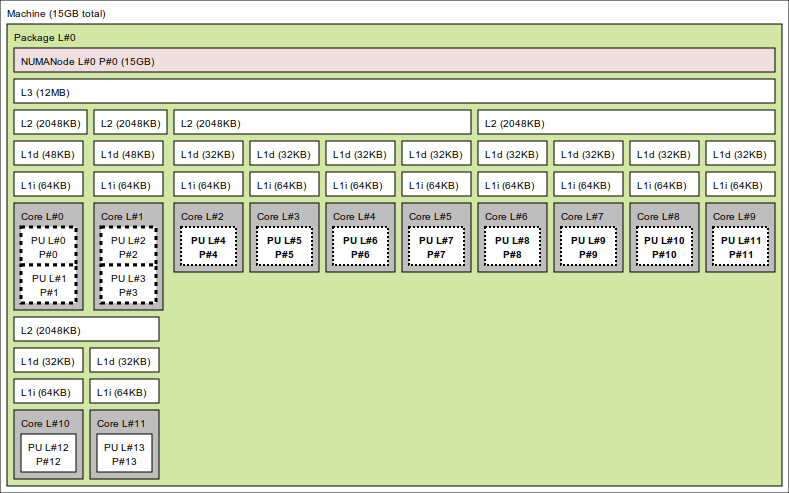
Here the choice of core changes what you measure: land on CPU 4 and you get an E-core at lower clocks; on CPU 12 you lose the L3 too. Now compare that against my homelab server
Figure 2: My homelab server (AMD Ryzen 7 PRO 8700GE). Eight identical cores with identical caches; the NVMe drives and the NIC hang off PCIe on the right.
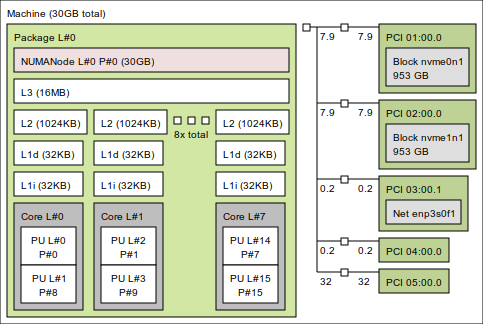
On the server every core is as good as any other: homogeneous machines make better benchmarking boxes. The PCIe side matters once a benchmark touches I/O: it shows which NVMe or NIC you are exercising and, on multi-socket machines, which NUMA node it hangs off.
Pin to a core §
The scheduler is free to migrate the benchmark between cores, and every migration throws away warm caches. On hybrid CPUs it’s worse: performance and efficiency cores run the same code at very different speeds, so results turn bimodal depending on where the process lands. Pin the benchmark to a single core (on hybrid parts, a P-core)
$ taskset -c 2 ./benchmark ...
The mean falls to 55.3 µs and the CV better than halves, to 1.06%.
The win is bigger than migration costs alone would suggest: every burst
now wakes the same core, so that core’s clock never has time to sag
between bursts.3 3
Pinning puts the benchmark onto the core but does
not keep other tasks off it. On a busy box, go further and reserve
the core for the benchmark alone, either on the kernel command line
(isolcpus=2 nohz_full=2 rcu_nocbs=2) or at runtime with a cpuset
cgroup.
Lock the CPU frequency §
By default Linux scales the CPU frequency with load, so the benchmark
starts on a cold, slow clock and finishes on a hot, fast one. Switch
the frequency governor to performance to keep clocks locked high
$ sudo cpupower frequency-set --governor performance
and verify it took effect
$ cat /sys/devices/system/cpu/cpu0/cpufreq/scaling_governor
performance
Re-measuring gives a mean of 54.9 µs and a CV of 0.79%. The increment looks modest only because pinning already kept our core’s clock warm: on its own, the performance governor takes the unpinned baseline from 99.6 µs straight to 54.5 µs. Either way, no burst ever wakes up on a cold clock again.
Disable hyperthreading §
CPU still shares its execution units and L1/L2 caches with its SMT sibling: anything the scheduler places there perturbs our measurement. Disable SMT entirely
$ echo off | sudo tee /sys/devices/system/cpu/smt/control
The CV drops to 0.26%, three times better: the core now has its execution units and caches all to itself.
Disable turbo boost §
Even with the performance governor, turbo frequencies vary with temperature and power budget: the same run on a warm machine clocks lower than on a cool one. Disable turbo for stable clocks
$ echo 0 | sudo tee /sys/devices/system/cpu/cpufreq/boost
On this machine nothing changes, since our short bursts never gave the silicon time to boost anyway. On a machine where turbo does engage, expect the mean to climb instead: you are giving up peak performance. That trade is fine, since when optimizing we care about relative numbers, and those are now comparable across runs.4 4 Low-latency production tuning makes the opposite call and keeps turbo on: there, every nanosecond counts. The most latency-sensitive trading shops go further and run overclocked servers, locked at a fixed all-core frequency above stock—speed and stable clocks, bought with better cooling.
Summary §
Here is the whole journey in one table, each row adding one change on top of all the previous ones. We went from almost 3% of noise down to 0.26%, and got 1.8x faster along the way; differences of half a percent are now real, measurable signal.5 5 Feel free to reproduce on your machine using the benchmark from my CppPlayground repository.
| Step | Mean | StdDev | CV |
|---|---|---|---|
| Untuned | 99.6 µs | 2.70 µs | 2.72% |
| + pinned to one core | 55.3 µs | 0.59 µs | 1.06% |
| + performance governor | 54.9 µs | 0.43 µs | 0.79% |
| + hyperthreading off | 55.3 µs | 0.15 µs | 0.26% |
| + turbo disabled | 55.5 µs | 0.14 µs | 0.26% |
On busier machines there is a longer tail of knobs worth trying: disabling address space layout randomization, the NMI watchdog, or transparent huge pages. The bench-remote.sh script applies all. None of it survives a reboot, which is exactly what you want: tune, measure, and reboot back to a normal machine.
Long live reproducible benchmarks!